Microsoft Entra ID Update: Synced Passkeys & High-Assurance Recovery
- Konstantin Slavin-Borovskij
- Identity , Security
- December 18, 2025
Table of Contents
Microsoft Entra ID Update: Synced Passkeys & High-Assurance Recovery
The march toward a passwordless, phishing-resistant future just got a significant acceleration boost.
For years, the gold standard for secure authentication has been FIDO2 hardware security keys (like YubiKeys). They are virtually unphishable. But they have drawbacks: cost, logistics of distribution, and the user experience friction of carrying a physical dongle.
“Synced passkeys” (software-based FIDO2 credentials stored on devices like iPhones or Androids that sync via iCloud Keychain or Google Password Manager) offer a much better user experience. Until recently, however, enterprises hesitated to adopt them because they lacked the control and visibility needed for corporate security.
In a major announcement, Microsoft Entra ID is changing that paradigm.
Here is a breakdown of the public preview of synced passkeys and the crucial new feature that makes them viable: high-assurance account recovery.
The Shift to Synced Passkeys
Microsoft Entra ID now supports phishing-resistant authentication using the passkeys users already have on their personal or corporate mobile devices.
Previously, organizations often blocked FIDO2 registration from mobile devices because they couldn’t distinguish between a highly secure hardware key and a software-based synced key.
With this update, Entra ID policies have become granular. Admins can now define exactly which types of passkeys are acceptable based on their Authenticator Attestation Global Unique Identifier (AAGUID).
Granular Admin Control
You no longer have to allow “all FIDO2” or “none.” You can create policies that, for example:
- Allow hardware keys (like YubiKey) for your highest privileged admins.
- Allow synced passkeys (like iCloud Keychain or Google Password Manager) for the general user population.
This is managed in the Entra portal under Authentication methods > FIDO2 security key.
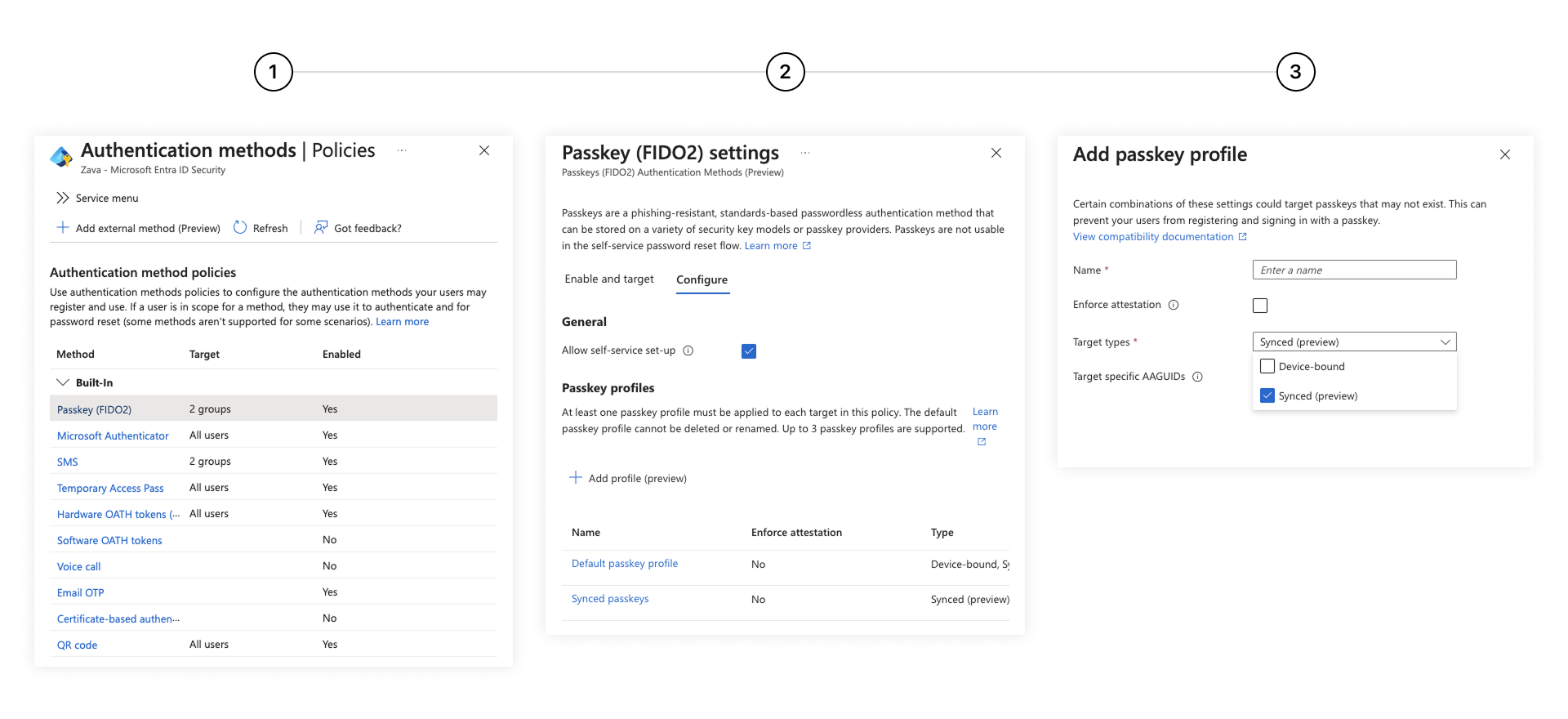
As shown in the screenshot above, admins can now specifically allow or block providers based on their AAGUID. Microsoft provides a list of common AAGUIDs (like Apple’s iCloud Keychain and Google Password Manager) to make configuration easy.
When a user logs in, Entra ID checks the AAGUID of the passkey they present against the policy to decide if access should be granted.
Solving the “Lost Phone” Problem: High-Assurance Recovery
Moving to passkeys is great until a user loses their phone or gets a new laptop and loses access to their synced credentials.
In the past, recovery options were poor. You either had to:
- Fall back to phishing-susceptible methods like SMS or passwords (defeating the whole purpose of passkeys).
- Have an expensive, cumbersome helpdesk identity verification process.
Microsoft is addressing this with a new high-assurance account recovery flow.
The New Recovery Workflow
Instead of relying on weak secondary factors, this new capability allows organizations to establish a secure, self-service process for users to register a new strong authentication method when their primary one is lost.
This process uses centralized registration of recovery methods that maintain the phishing-resistant security posture during the recovery phase.
The User Experience: When a user needs to recover their account, they are guided through a secure registration flow for a new device or passkey, rather than just resetting a password via email link.
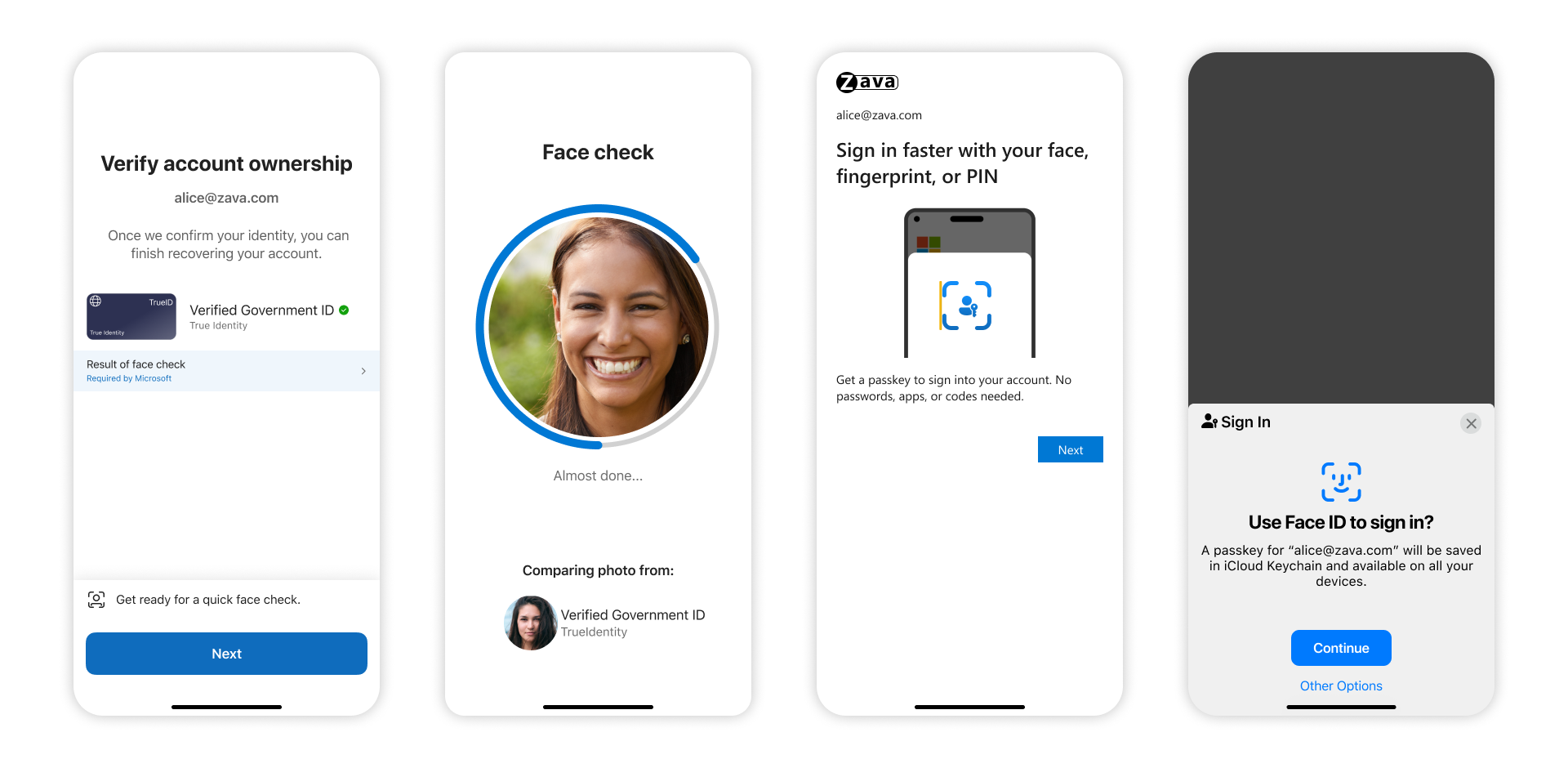
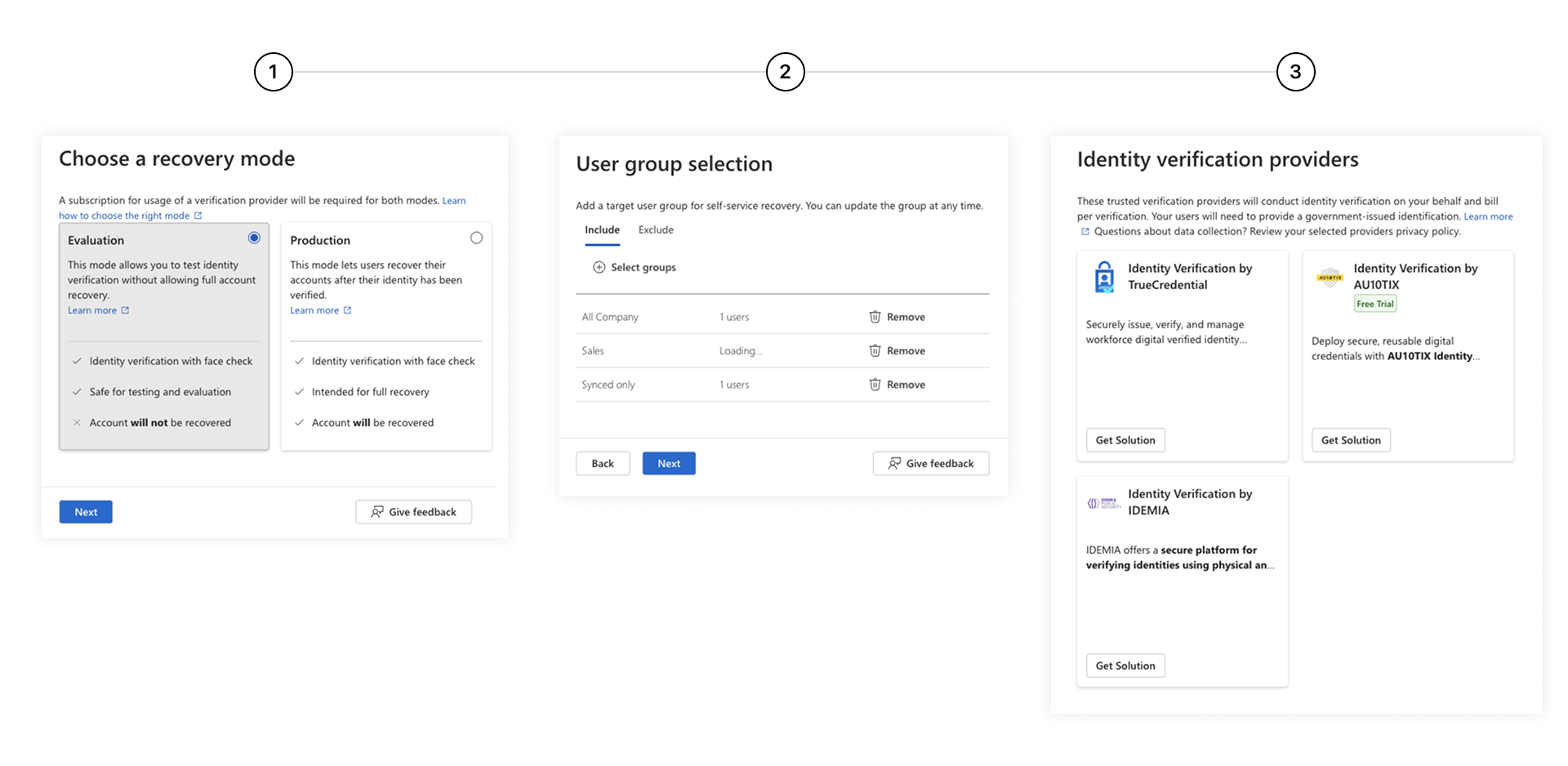
The Admin Configuration: Admins have control over how these recovery policies are applied, ensuring that the recovery process itself meets the organization’s security standards. You can configure trusted Identity Verification Providers (IDV) like Onfido or IDEMIA, to verify a user’s government ID and face biometrics before allowing them to reset their passkey.
Why This Matters for Your Organization
This announcement removes the biggest hurdles to broad deployment of phishing-resistant authentication:
- Cost and Logistics: You don’t need to buy a hardware key for every single employee. You can leverage the secure enclaves in the smartphones they already use.
- User Experience: Users prefer FaceID/TouchID on their phone over plugging in a USB stick. Synced passkeys offer a consumer-grade experience with enterprise-grade security.
- Viable Lifecycle Management: The high-assurance recovery flow means you can finally turn off passwords completely without overwhelming your helpdesk with “I lost my phone” tickets.
This feature is currently in Public Preview. It is highly recommended that Identity teams begin testing this in their labs, as it likely represents the future default for enterprise authentication.
To read the full technical details, visit the official Microsoft announcement here: Synced passkeys and high assurance account recovery